
 Check Price Now
Table of Contents
- Introduction
- Tata Steel Vendor Registration Process (2026)
- Tata Steel Vendor Registration Form: Key Fields Explained
- Documents Required for Tata Steel Vendor Registration
- Mandatory Fields in Tata Steel Vendor Registration Form
- Tata Steel Procurement Portal
- Tata Steel Procurement Portal Log In Steps
- Who is a Vendor?
- Common Mistakes and Tips for Faster Tata Steel Vendor Approval
- What Happens After Vendor Registration Submission
- Conclusion
- FAQs
Introduction
Becoming a Tata Steel vendor can open doors to consistent business, but the registration process often slows MSMEs down due to small errors. Issues like PAN mismatch, incorrect category selection, or weak documentation can delay approval significantly.
This guide explains the Tata Steel vendor registration process step by step, including the correct portal, key form fields, required documents, and practical tips to avoid rejection. If you want faster approval and fewer back-and-forth emails, this article is structured to help you get it right the first time.
What this guide covers
- The correct portal route on the Tata Steel eProcurement portal and when Tata Steel eProc login applies.
- Key Tata Steel vendor registration form fields that need extra care.
- A supplier registration documents checklist that reduces back-and-forth.
- What usually happens after submission, so timelines and communication stay predictable.
Who this is for
This guide is specifically structured for Indian MSMEs, small suppliers, service partners, and logistics vendors who want to complete Tata Steel supplier registration with fewer avoidable delays.
Tata Steel vendor registration process (2026)
Stage 1: Go to the official portal
Visit the Tata Steel Procurement page and select “Vendor Partner Registration” for new vendors. Do not choose Vendor Zone, as it is only for existing suppliers.
Stage 2: Access the Registration System (OVRS)
You will be redirected to the Online Vendor Registration System (OVRS). Click “Sign Up” to begin the registration process.
Stage 3: Fill Initial Registration Form (Phase 1)
Enter the required basic details:
- Organisation name (must match PAN records)
- Email ID and mobile number (OTP verification required)
- PAN and location
- Nature of business and category
- Create login credentials
Upload basic documents and submit the form. Make sure to save the acknowledgement number generated after submission.
Stage 4: Internal review
The procurement or category team reviews your application.
Possible outcomes:
Approved → moves to the next stage.
Returned → corrections required.
Rejected → process ends.
All communication is shared via the registered email ID.
Stage 5: Detailed registration form (Phase 2)
If your initial application is approved, log back into the portal and complete the detailed vendor form.
This includes:
- Company profile and capabilities
- Technical details
- Financial information
- Certifications
- Past project experience
- Compliance declarations
Stage 6: Evaluation and qualification
Tata Steel conducts internal evaluation, including:
- Technical assessment
- Commercial review
- Compliance checks
You may receive clarification requests during this stage.
Stage 7: Vendor activation
Once approved, your vendor profile is activated.
You can then access the Vendor Zone to:
- View tenders
- Participate in RFQs
- Submit bids
Process summary
Procurement page
→ Sign Up (OVRS)
→ Initial form submission
→ Internal review
→ Detailed form
→ Evaluation
→ Vendor approval and activation
Important note
Vendor registration does not guarantee business. Selection depends on requirement fit, category alignment, and capability.
What often slows MSMEs down
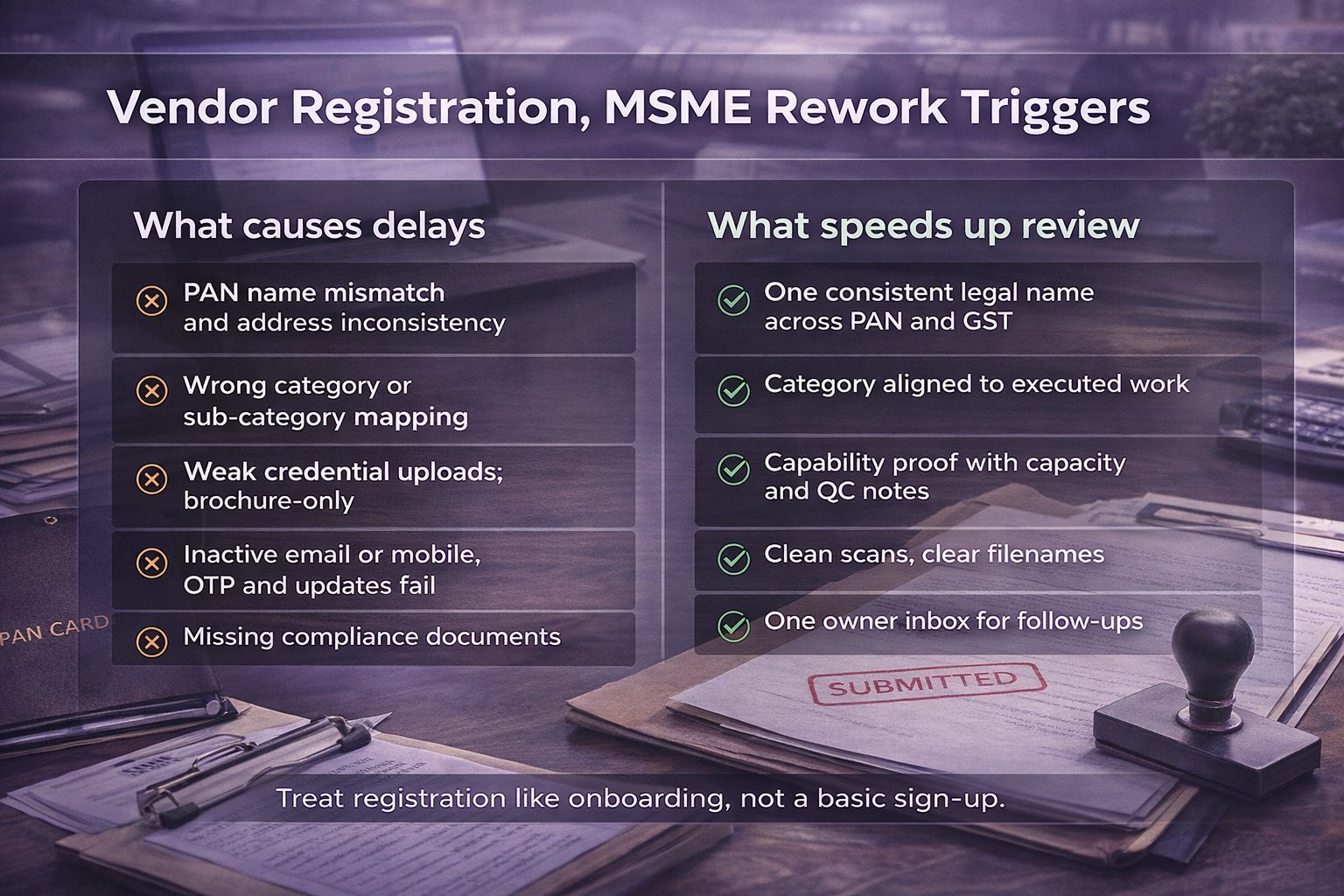
Most delays do not come from a lack of capability. They come from gaps that create verification work.
Common causes include:
- Organisation name not matching PAN records, or inconsistent address details.
- Choosing a category or sub-category that does not reflect actual supply scope.
- Uploading a brochure that lacks capacity, certifications, or past work proof.
- Using inactive email IDs or numbers, which breaks OTP and updates.
- Missing basic supplier compliance documents needed for onboarding checks.
Tata Steel vendor registration form: Key fields explained

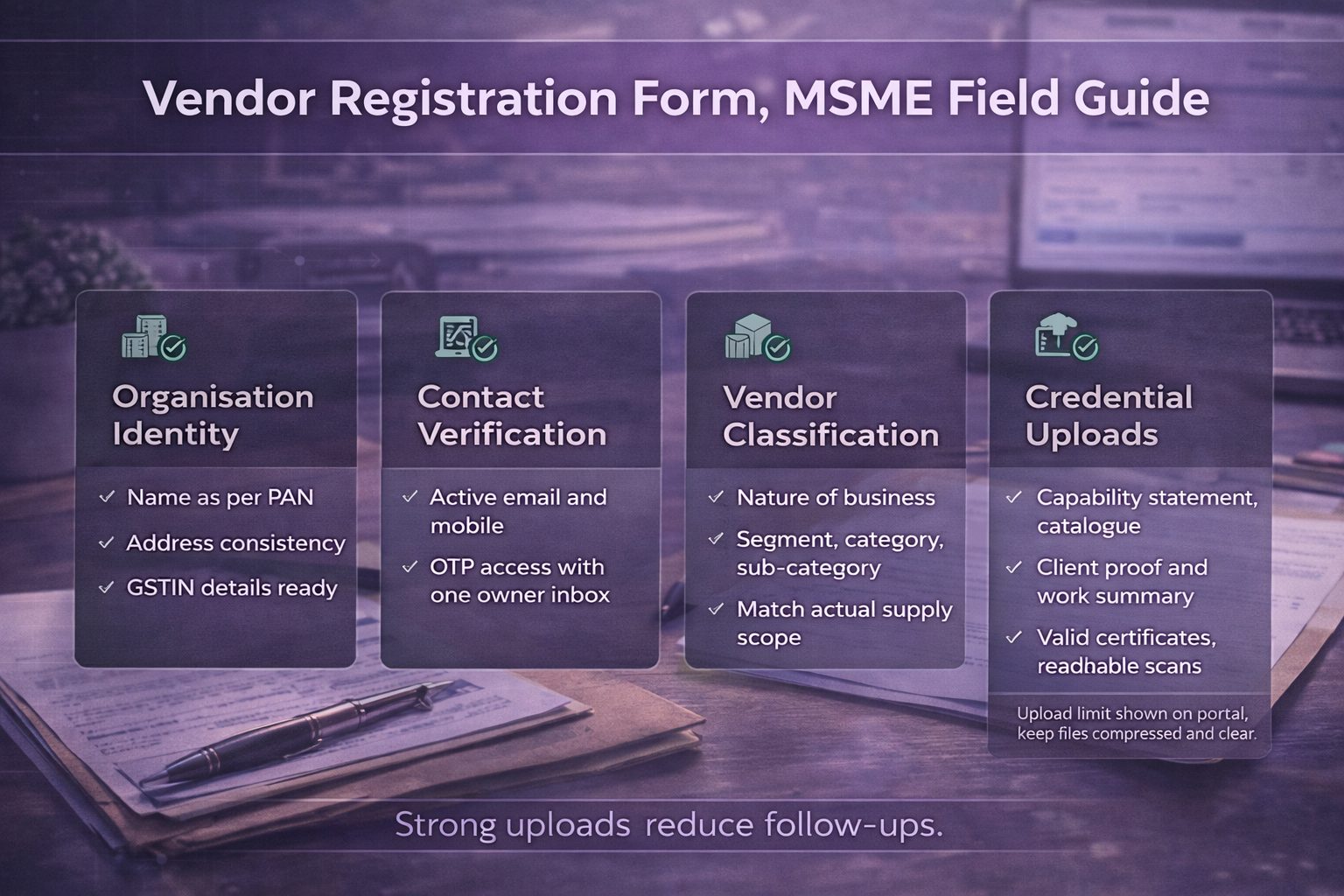
The Tata Steel vendor registration form is where most delays occur. Accuracy matters more than speed, as even small errors can trigger verification issues or rework during review. Paying close attention to key fields improves approval chances and reduces back-and-forth communication.
Organisation details
Enter the organisation name exactly as per PAN records. Even minor differences in spelling, spacing, or format can lead to rejection or clarification requests during verification.
Contact information
Use an active email ID and mobile number for registration. All OTP verification, status updates, and communication from Tata Steel will be sent to these details, so consistency is critical.
Vendor classification
Select the correct nature of business, category, and sub-category based on your actual supply capability. Procurement teams use these filters to shortlist vendors, so incorrect selection can reduce visibility or delay approval.
Credential uploads
Upload documents that clearly demonstrate your capability, such as certifications, client work, product catalogues, and project experience. Avoid generic brochures that do not provide verifiable proof.
Declarations
Carefully review all declarations, including compliance and GDPR-related terms. Vendor registration is subject to due diligence, and incomplete or incorrect declarations can slow down the process.
Pro tip: Treat the form as a qualification document, not just a basic sign-up. A clear, accurate, and well-supported submission improves your chances of faster approval.
Documents required for Tata Steel vendor registration
Keeping the required documents ready before starting the Tata Steel vendor registration process helps avoid delays and repeated uploads. A complete and well-prepared document set improves verification speed and increases approval chances for suppliers and MSMEs.
PAN card (Organisation)
Submit the organisation’s PAN card with details that match exactly with the registration form. Any mismatch in name or format can lead to rework.
GST registration (If applicable)
Provide GSTIN details if your business is registered under GST. Ensure the registration status is active and details are accurate.
Address proof
Upload valid address proof that aligns with your registered business location. This helps in identity and compliance verification.
Bank details
Submit bank proof such as a cancelled cheque or bank letter. This is required for payment processing and vendor onboarding.
Capability profile or brochure
Include a company profile or product catalogue that clearly explains your offerings, capacity, and business scope.
Certifications
Upload relevant certifications such as ISO or quality standards. Valid certifications strengthen credibility during evaluation.
Past work proof
Provide evidence of previous work, including client lists, work orders, or project summaries. This helps demonstrate real execution capability.
Best practices for document uploads
Ensure all files are clear, readable, and properly named (for example, “CompanyName_PAN.pdf”). Check validity dates before uploading, as expired or unclear documents are a common cause of vendor registration delays.
Mandatory fields in Tata Steel vendor registration form
To begin the process of online vendor registration Tata Steel, you will have to select the second option mentioned in the Procurement page.
This will take you to the Tata Steel vendor portal: tslcorpsys.tatasteel.co.in:8182/vendorreg/Login/UserLoginNew/
The Online Vendor Registration page will appear which gives you two options:
- Log In: Existing vendors can log in using their Username (email ID) and Password.
- Sign-Up: For new users to register online as a vendor.
What appears after selecting “Sign Up”
After selecting sign up on the Online Vendor Registration page, the Tata Steel vendor registration form opens. This form is also referred to as the supplier registration form. It captures business identity, contact verification, vendor classification, and credential uploads in one place.
Quick reference table for MSMEs
| Form area | What to enter | MSME tip | Common slip |
| Organisation name | As per PAN | Keep spelling and spacing consistent | PAN mismatch triggers rework |
| Contact details | Active email and mobile | Use a shared procurement inbox | OTP and updates get missed |
| Category selection | Closest supply scope | Match to past executed work | “Other” selected too often |
| Credentials | Capability proof | Add client list and certificates | Uploads look generic |
Note: At the bottom of the box, there is the Vendor Manual – a document you can view to learn more about the Tata Steel online vendor registration process.
Also read: How to increase procurement efficiency with demand aggregation
Tata Steel Procurement portal log in steps
Use the Vendor Zone login when portal access is available. The login page supports user credentials and vendor code selection.
- Open the Tata Steel eProc login page
- Enter user ID and password
- Complete the verification prompts shown on screen
- Select the correct vendor code if prompted
- Access the supplier dashboard for eProcurement actions.
Also read: Tata Steel and the journey of the first iron and steel industry in India
Tata Steel procurement portal
A commonly asked question is – How can I become a Tata Steel vendor?
To begin, you will first have to visit the Procurement Tata Steel page: tatasteel.com/corporate/our-organisation/procurement/
This page outlines the vision and commitment to procurement the company follows and some key things to keep in mind as a company vendor. So, whether you’re a new or existing vendor, choosing the right starting point makes the process simpler. Therefore, to help you with that here’s a quick guide to help you access the portal efficiently.
Start from the official Procurement page
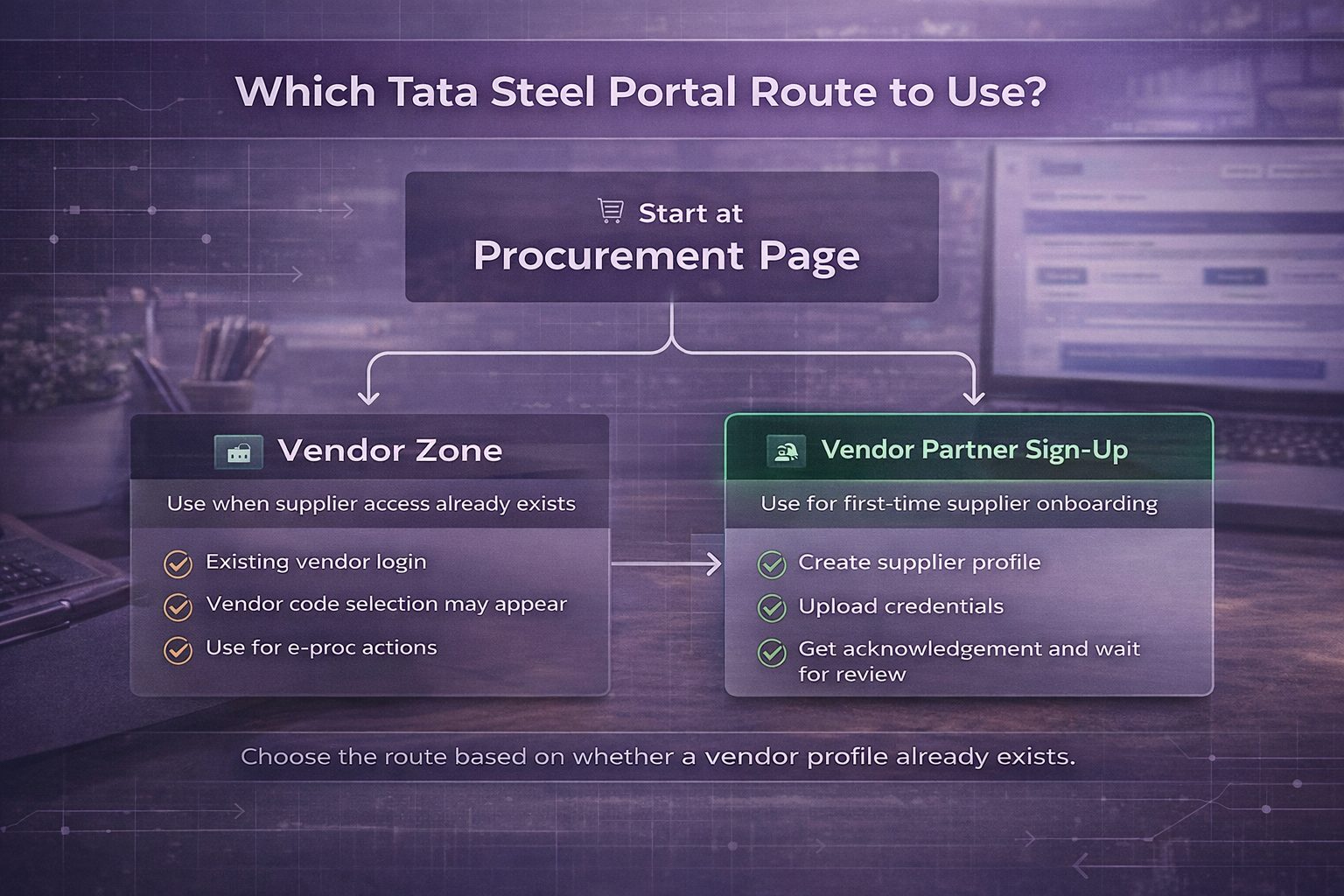
Begin from Tata Steel’s Procurement page. It shows two clear routes, Vendor Zone for existing vendors and an option to explore business opportunities as a vendor partner for new registrations. Starting here reduces confusion, because the same page guides both existing suppliers and first-time applicants.
Choose the right route
Use the route based on what already exists in the system.
- Vendor Zone: for suppliers who already have portal access and need to sign in to the e-Procurement system.
- Vendor Partner sign-up: for first-time supplier registration, where the business profile is created and documents are uploaded for review.
Practical portal tips for MSMEs
Use one consistent organisation name across PAN, GST, and the registration details. Keep a single active email ID and mobile number for verification and updates. After the correct route is selected, the next section explains the step-by-step registration flow, followed by how Tata Steel eProc login works for vendors.
Also read: Tata Steel procurement process
Who is a vendor?
As a business owner, before you participate in the Tata Steel vendor registration process, here’s a simple understanding of what is the meaning of a vendor to check whether or not you fit.

A vendor is a business that supplies goods or services to another business under defined quality, delivery, and compliance expectations. In large procurement systems, a vendor is not only a seller. The vendor is also a registered entity with verified documents, a declared supply scope, and a track record that can be evaluated over time.
For MSMEs, this matters because onboarding is usually designed to reduce risk. Procurement teams need clarity on what can be supplied, where it can be supplied, and how reliably it can be delivered.
Also read: MSME payment terms for vendors and suppliers.
Common vendor types MSMEs fall into
Vendor registration is open to different supplier categories. Many MSMEs fit into one of these groups, based on what is supplied and how the work is executed.
- Material suppliers: industrial inputs, spares, consumables, packaging materials.
- Service partners: maintenance, fabrication, inspection, manpower services.
- Logistics partners: transporters, fleet operators, last-mile and site delivery support.
- Project support vendors: civil, electrical, instrumentation, or shutdown support services.
What procurement teams usually need to see
A vendor profile becomes stronger when it shows proof, not only intent. A capability statement that mentions capacity, machinery, QC checks, delivery coverage, and past projects helps screening. Statutory records and valid certificates reduce compliance back-and-forth. This becomes even more important when supplier onboarding includes responsible supply chain commitments and declarations.
Also read: Difference between vendor, supplier, distributor
Common mistakes and tips for faster Tata Steel vendor approval
| Area | Common mistake | Impact on approval | How to fix |
| Organisation details | PAN and organisation name mismatch. | Triggers verification issues and rework. | Ensure exact match with PAN records. |
| Vendor classification | Incorrect category or sub-category. | Reduces visibility or delays approval. | Select based on actual work experience. |
| Credentials | Generic brochures without proof. | Weakens credibility during evaluation. | Upload certifications, client work, project details. |
| Documents | Expired or invalid certificates. | Causes rejection or resubmission. | Check validity before uploading. |
| File quality | Unreadable or poorly scanned documents. | Slows verification process. | Upload clear, properly named files. |
| Contact information | Inactive email ID or phone number. | Missed OTPs and communication delays. | Use one active and consistent contact. |
| Form completion | Missing mandatory fields. | Application remains incomplete. | Double-check all required fields. |
| Communication | Slow response to clarification emails. | Increases approval timeline. | Respond promptly from registered email. |
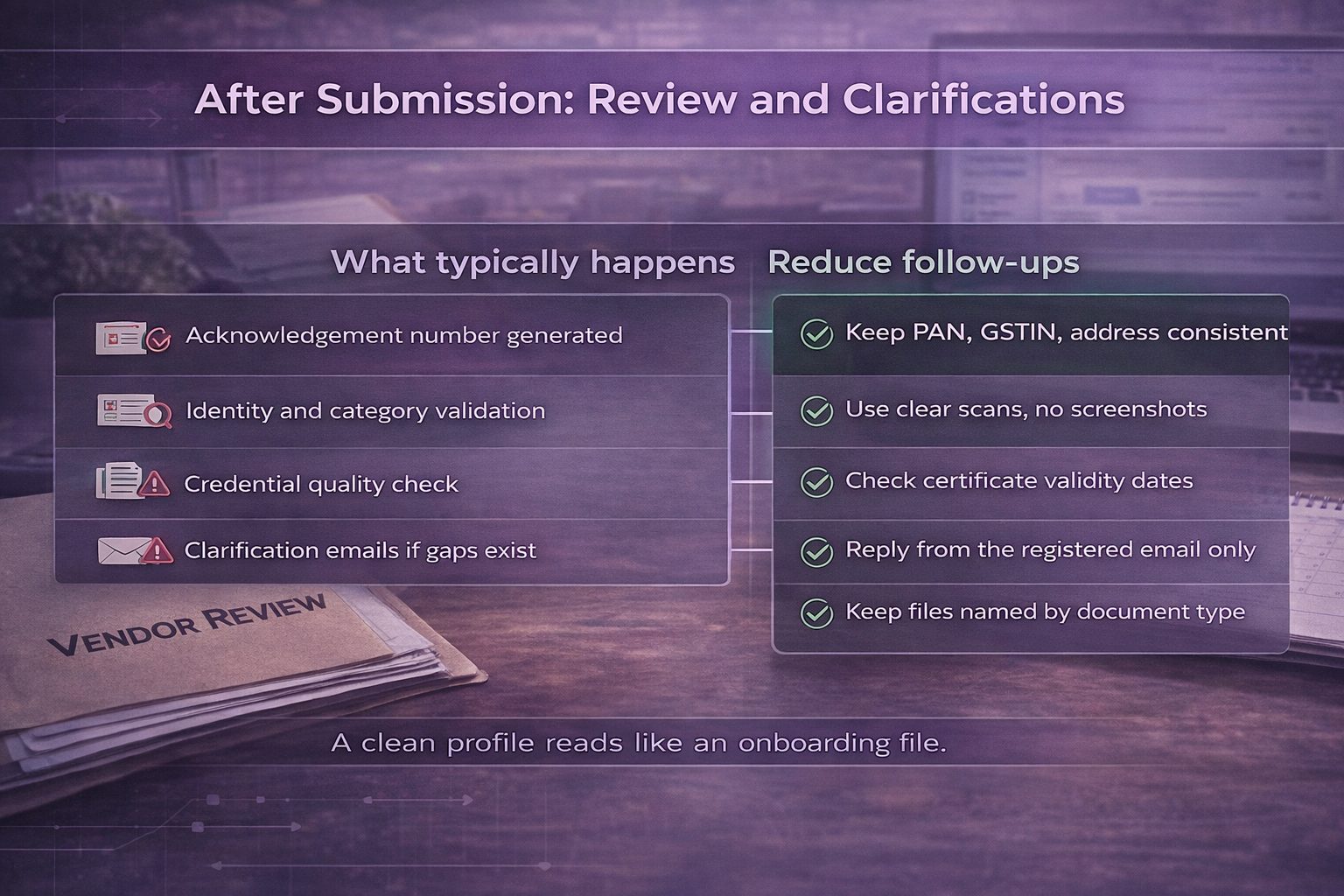
What happens after vendor registration submission
| What happens | What you should do |
| Application is reviewed by procurement team | Ensure all details are accurate before submission |
| PAN, GST, and documents are verified | Upload clear, valid, and up-to-date documents. |
| Category and capability are evaluated | Select the correct category based on actual work |
| Clarification emails may be sent | Respond quickly from your registered email ID |
| Documents may be re-requested | Keep files ready for quick re-upload |
| Details may need correction | Double-check entries to avoid rework |
Note: Approval timelines depend on submission accuracy and response speed.
Conclusion
Tata Steel vendor registration should be treated as a qualification process, not just a sign-up. Successful applications stand out through accuracy, consistency, and clear proof of capability. Procurement teams prioritise complete and verifiable profiles aligned with actual business scope. For MSMEs, focusing on readiness and correctness improves approval speed and reduces rework. A well-prepared application not only moves faster through evaluation but also strengthens long-term visibility in procurement opportunities.
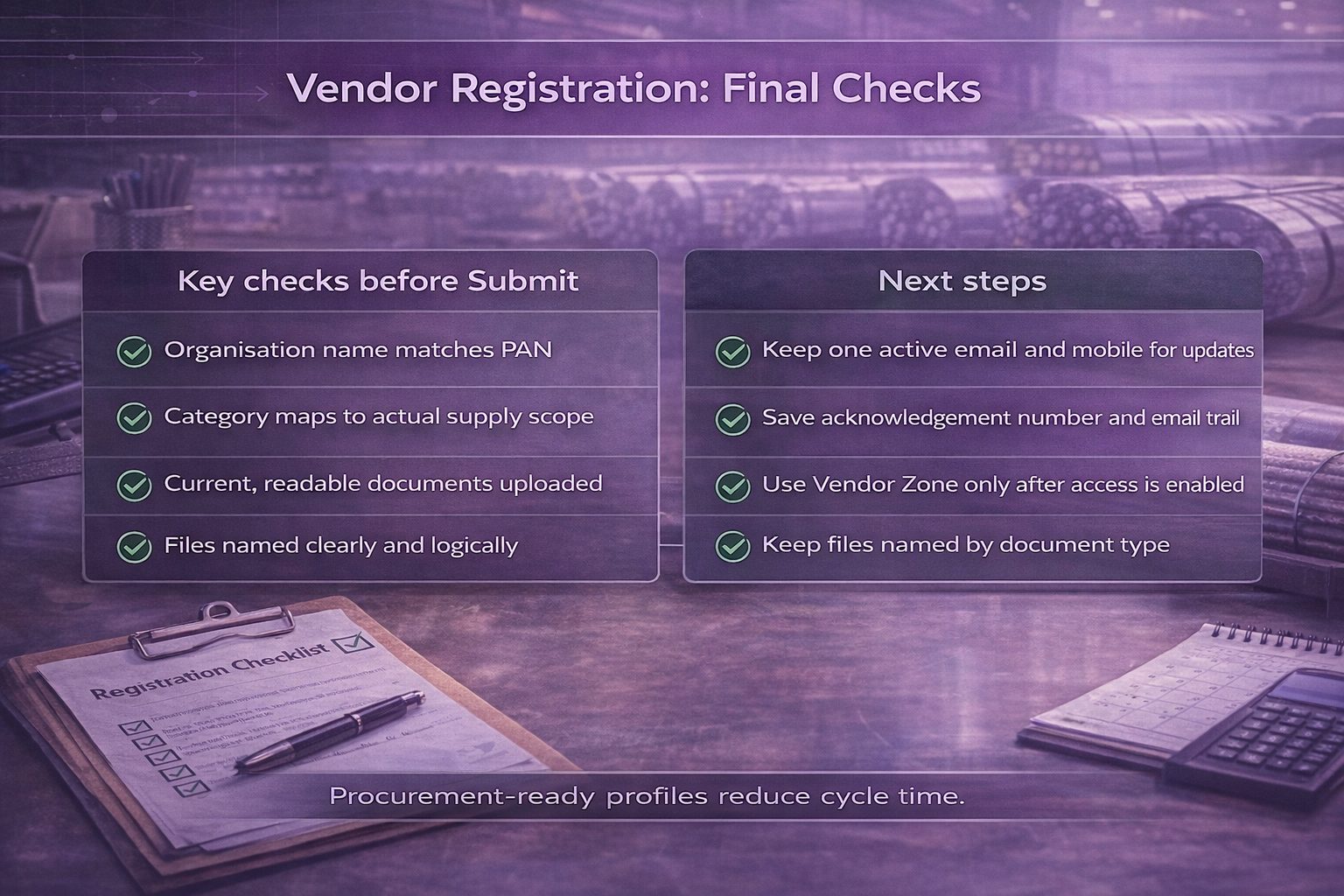
Key checks before hitting Submit:
- Match organisation name exactly with PAN records.
- Pick the closest category and sub-category to actual supply scope.
- Upload readable, current documents with clear file names.
Next steps
Use this approach to keep the cycle predictable:
- Keep one active email and mobile number for verification and updates.
- Save the acknowledgement number and track clarifications on the same email thread.
- After access is enabled, use Vendor Zone and Tata Steel eProc login for procurement actions.
A procurement-ready profile improves discoverability in sourcing cycles and reduces rework during review.
Also read: Tips to improve the procurement process in business
Looking to procure steel?
Tata nexarc helps manufacturers, builders and MSMEs source certified steel products, compare prices, and choose the right grade as per IS codes—with complete traceability and procurement confidence.
FAQs
How should a group company register if invoicing and execution happen in different entities?
What should be done if the procurement email is managed by a vendor’s sales team and keeps changing?
How should a vendor present capacity proof without sharing sensitive customer pricing or contracts?
How should a logistics vendor prove coverage for plant and site deliveries beyond major cities?
How should a vendor respond when procurement asks for “past performance” but the business is new?
What is the best approach when the vendor supplies through an authorised distributor model?
How should MSMEs prevent delays caused by inconsistent address formats across PAN, GST, and bank records?
What should be included in a capability statement to pass procurement screening faster?
How do vendors reduce disputes later by setting expectations during onboarding itself?
What is a practical way to track registration status internally across multiple business units?
Sohini is a seasoned content writer with 12 years’ experience in developing marketing and business content across multiple formats. At Tata nexarc, she leverages her skills in crafting curated content on the Indian MSME sector, steel procurement, and logistics. In her personal time, she enjoys reading fiction and being up-to-date on trends in digital marketing and the Indian business ecosystem.




Like the fact registration process has been kept as simple as possible. Some more details about the “GDPR” terms would be helpful, as I don’t understand its implications for steel procurement.
The drop-down menus for the ‘Nature of Business’ and ‘Segment Name’ were super helpful. I found my exact categories easily..thanks for simplifying the process.Kudos!
Can I tata project vendor Registration
I am getting following error:
Error in GDPR
The underlying connection was closed: An unexpected error occurred on a receive.
The GDPR form is not opening. I have tried deleting cache & used different browser
Hi Aditya,
This seems a temporary error. pls visit in a few days, you will see this fixed and then complete your vendor registration process at TATA steel.
Helo.
MoharajaEntcvl144@gmail.com
Hello Tata Steel Team,
I hope you are well. I am in the process of completing the vendor registration for Shree Radha Metals, based in Ludhiana, and I have a few questions:
Location: How should I proceed since there is no option for Ludhiana?
Nature of Business: I selected “Dealers and Distributors.” Is this appropriate?
Segment Name: The only option is “MRO.” Is this correct for our business?
Category: I’m considering “Mechanical and Safety” for our HR sheets and color-coated sheets. Does this fit, and what should I select for the subcategory?
Thank you for your guidance!
Did you get any call so far from the Vendor Registration team to process the details further?
While entering PAN number it is giving alert that PAN number already exist.
how to find out which mail id, mobile number it is registered.
You need to check internally, who initiated the process before. If you are still not able to address then it is going to be a long process. Pls contact the support team. They will only help you around it.
Hello Tata Steel Team,
I am in the process of completing the vendor registration for GRW PUMPS PRIVATE LIMITED, based in KOLKATA,WEST BENGAL, and I have a few questions: How should I tracking our registration application & how much time to take as registered vender on Tata Steel E-procurement?
HI TATA STEEL TEAM
I AM WANT TO VENDOR REGISTARTION FOR GIVE SERVICE IN VERIOUS SECTOR IN TATA STEEL AS REQUIRED.I HAVE ALL ELIGIBILITY FOR VENDOR
BUT WANT TO KNOW
I AM WANT TO KNOW IF I AM NOT MENTIONED ANY REFRENCE IN REFRENCE BOX MY APPLICATION IS SELECTED OR REJECTED
Hi Sahil,
Kindly share your details and query on
Email- vendormgmt.group@tatasteel.com and here are few contact numbers which you can use to talk also. Contact No.- 0657-6644466, 08069165100
Hi Sahil, please help me with the below query.
I am planning to do vendor registration at Tatasteel.
Currently, we are a propertary company and having PAN on my name.
My question is – is this ok to apply with Company name with Individual PAN number?
In proprietorship, you should apply for PAN on business name. In general, PAN number also indicates the type of the accounts it is connected with like saving or current. In proprietorship, you should be having current account and PAN connected with it. Only then you can meet compliance.
while selecting “get started” a pop us is asking for “select Factory License Certificate file” is being displayed. Please advise what to do with this to submit vendor registration form
I am in the process of Tata steel vendor registration for BADAL OFFSHORE DIVING & ENGINEERING PVT LTD . but last one month process is under process . So please tell me that what can i do for Tata steel vendor registration.
Kindly put an email to support team for the same.
We are trying to enter the details of PAN as asked in the portal.
However, it is showing PAN already exists.
Are we already registered does it mean.
USER ID – FORGOTTEN
I would advise you to check internally if somebody else has done the registration on portal before. The message indicates that you are already registered. kindly put an email to support team.